Can Windows recover a formatted SD card on its own?
Windows can restore a File History or OneDrive backup, or scan with the free Windows File Recovery tool. Neither reverses the format. Windows File Recovery only finds files on an SD card in its Extensive (signature) mode.
Check your backups before installing anything. Restoring photos from File History or OneDrive is faster and cleaner than a recovery scan, but only covers files you already copied off the card.
Windows File Recovery (winfr):
You can get Microsoft's free Windows File Recovery from the Microsoft Store. Its command syntax is awkward. The official Microsoft documentation specifies Extensive mode for non-NTFS file systems. SD cards are almost always FAT32 or exFAT, so "Regular" mode finds little to nothing. Choose Extensive (signature) mode, or use a graphical program that runs the same scan without commands.Does CHKDSK or a Command Prompt trick recover it?
No. CHKDSK, ATTRIB, and "chkdsk /f" fix file-system errors; they cannot rebuild formatted files. Letting CHKDSK write to a damaged card can lower your recovery odds.
MiniTool's guide confirms that these commands cannot help recover data from a formatted SD card. On a RAW or damaged card, CHKDSK may appear to repair the volume while overwriting data a recovery scan could still read.
Recover your files before you let anything repair the card. CHKDSK and ATTRIB can write changes to a formatted or RAW volume.
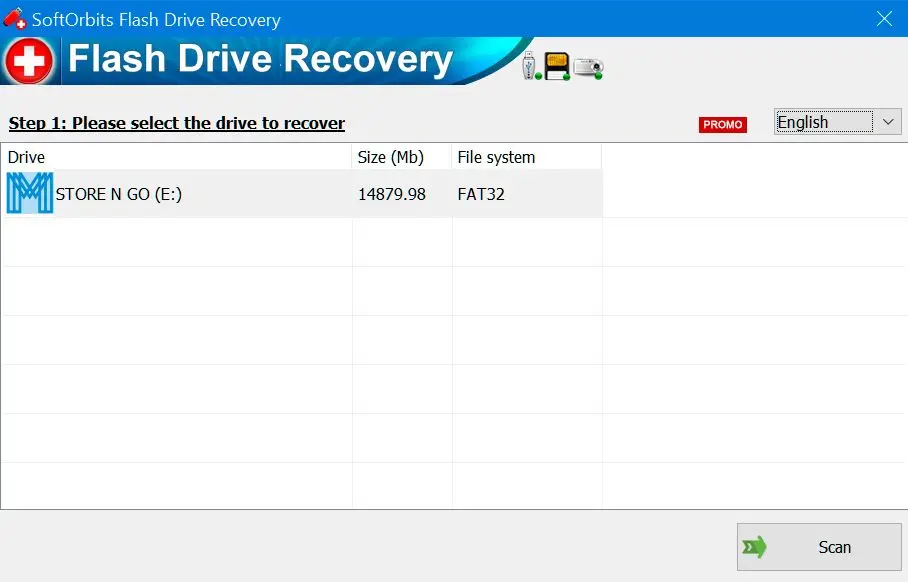
SoftOrbits Recupero Chiavette USB ripristina i file da memorie USB, schede di memoria e fotocamere. Recupera file cancellati o corrotti in seguito a formattazioni rapide o errori del file system, grazie al pieno supporto dei formati FAT32 e NTFS e ad algoritmi di scansione ottimizzati per il recupero dati su memorie flash.
Free vs paid: is free SD card recovery good enough?
PhotoRec and Windows File Recovery can recover a formatted card for free, though both use a command line and lack an easy preview. Paid programs like SoftOrbits Flash Drive Recovery offer previews, simpler steps, and support.
With free sd card recovery software, you reach the same underlying data. Paying gets you an easier workflow and help when a scan stalls. PhotoRec is the standout free option. Its documentation says it "ignores the file system and goes after the underlying data," so it works on reformatted or badly damaged file systems.
The PhotoRec project page lists the supported formats.
| Tool | Interface | Preview before saving | Signature-based scan | Cost |
|---|---|---|---|---|
| PhotoRec | Command line | No | Yes (about 300 file families) | Free |
| Windows File Recovery (winfr) | Command line | No | Yes, Extensive mode only | Free |
| SoftOrbits Flash Drive Recovery | Graphical | Yes | Yes | Free trial; paid license |
Where free tools stop:
Free tools leave you responsible for choosing the correct output drive. For a one-time rescue of important files, clicking through a preview and saving can be easier than learning scan flags.How to recover photos, RAW, and video files
Signature scans recover JPG photos, RAW files (.ARW, .CR2, .NEF), and MP4 videos the same way, provided nothing has overwritten them. Large 4K clips are the most fragile because they take up the most space.
Signature-based recovery recognizes each format's header pattern and reassembles its data, including Canon .CR2, Nikon .NEF, and Sony .ARW files. A long video spans many sectors. If any part was overwritten, you may recover a file that will not play cleanly. The same approach powers flash drive recovery for USB sticks and thumb drives.
What if the card is corrupted or shows as RAW?
A card that shows as RAW or asks to be formatted has lost its file-system map; its files may remain. Run a signature or deep scan first. If a program already failed, image the card to a file and recover from the copy.
Decline the Windows prompt "You need to format the disk before you can use it." When a card will not mount, dedicated data recovery software for corrupted sd card media reads it block by block and rebuilds files from signatures. This also applies to RAW external drives and external ssd recovery.
If recovery has already failed, make a single-file image and scan that copy to leave the original untouched. For a SanDisk device that will not appear, the guide to repair a SanDisk flash drive covers recognition problems. In one SanDisk community thread, changing the reader made an unrecognized card visible to recovery software.
General USB flash drive repair tools also cover sticks that will not show up, regardless of brand.

How to recover a formatted SD card on a Mac
On macOS, stop using the card, connect it through a reader, and run a Mac-native recovery program. SoftOrbits Flash Drive Recovery is Windows-only. You can use a macOS recovery program or borrow a Windows PC and card reader.
Open Disk Utility only to check that the card appears. Do not click Erase. Signature scanning applies on a Mac too.
How to prevent SD card data loss next time
Copy files off after every shoot. Eject the card safely, and confirm the files are backed up somewhere else before you format it.
Copy each shoot to two places before reusing the card. Eject through Windows to avoid pulling it mid-write. Keep a spare card so you do not have to reformat a full one during a session. The Kingston recovery tool guide covers Kingston cards and sticks. When you reuse a card, format it in the camera so its file system matches the device.
Pitfalls when recover formatted sd card
Most failed recoveries follow new photos, a second reformat, or saving recovered files back to the same card. These actions usually cause more damage than the original format. Avoid them to improve your chances.
Reddit's r/datarecovery has accidental-format threads where photos taken after the mistake overwrote the files people wanted back.
Another format or full format compounds the loss. One user wrote about 100GB of new data across two sessions and mostly recovered the wrong files. Image or scan before formatting.
The top reply in a widely upvoted r/videography thread stresses stopping all use until recovery is done.
Recovered output can overwrite files the scan has yet to read.
Over USB or MTP, many cameras hide the raw volume, so recovery software sees less than half of it. A card reader exposes the blocks a signature scan needs.
Sources